Most Shopify stores treat collection pages as a product grid and nothing else. Open any store. Click a collection. A title, maybe a one-line description, rows of product cards. That’s it.
That page is competing for the highest-intent keywords in your niche with almost no content on it.
“Men’s running shoes.” “Organic skincare.” “Gold necklaces.” People searching these terms are ready to buy. And Google ranks category-level pages for them, not product pages. Go check. Search any commercial keyword in your industry. The entire first page will be collection and category pages from retailers. Not individual products.
We’ve seen stores unlock 40% more organic traffic and meaningfully higher conversion rates just by optimising their collection pages. Some stores far more than that. The work compounds because every collection you optimise is another entry point from Google.
Here’s what we do to every collection page we touch.
Why Collection Pages Beat Product Pages for Commercial Keywords
When someone searches “waterproof hiking boots,” they’re not looking for one specific boot. They want to browse a range. Google knows this. That’s why it serves collection and category pages for these queries.
Product pages rank for the long-tail stuff: “Salomon X Ultra 4 GTX review.” Useful, but lower volume. Collection pages capture the broad commercial terms where the real revenue sits. The search volume difference between a category keyword and a product keyword can be 10x or more. This is why Shopify SEO strategy should start with collection pages, not product pages. (We cover product page SEO separately. It’s a different keyword strategy entirely.)
And yet most Shopify stores pour all their effort into product pages. Custom descriptions, review widgets, rich media. Meanwhile the collection page that should be ranking for the 10,000-searches-per-month category keyword has zero text content. Just a grid.
The “Double-Decker” Content Strategy
Thin content is the #1 problem on Shopify collection pages. Google has said it directly: when category pages have nothing except product links, ranking them is hard.
The approach that works is splitting content into two sections: a short introduction above the product grid and a detailed section below it.
Above the Products: 50-100 Words
This is the content that does the heavy lifting for rankings. Google weights text by its position on the page, and content near the top carries more influence than the same words buried at the bottom.
Keep it short. 50-100 words. Primary keyword in the first sentence. Explain what the collection is, who it’s for, and one thing that makes your range worth looking at. That’s it. The intro exists to give Google context and give shoppers confidence they’re in the right place.
Don’t write a wall of text here. Products need to be visible above the fold. Every word you add above the grid pushes products further down the page, which kills conversions, especially on mobile.
What good above-the-fold copy looks like:
A skincare store selling vitamin C serums doesn’t write “Welcome to our vitamin C serum collection.” That says nothing. Instead:
“Vitamin C serums formulated for New Zealand skin. 15-25% ascorbic acid concentrations across five formulations, from lightweight hydrating to intensive brightening. All vegan, all cruelty-free.”
That’s 30 words. It hits the primary keyword, communicates the range, and gives the shopper a reason to stay. No fluff. No filler paragraph.
For a dog collar store:
“GPS dog collars with real-time tracking, geofencing, and activity monitoring. Waterproof designs from Halo, Fi, and SpotOn, built for dogs that don’t stay in the garden.”
Two sentences. Keyword-rich without trying to be. Specific enough that a shopper knows exactly what they’ll find on this page.
Below the Products: 200-500 Words
This section sits after the product grid. Its job is addressing thin content signals, adding keyword depth, and giving Google more to work with. It won’t rank the page on its own, but it fills a gap that Google penalises you for leaving empty.
The trap most stores fall into: writing 500 words of keyword-stuffed garbage that nobody reads. Google’s John Mueller has called out bottom-of-page text blocks on category pages as a usability issue. The content needs to earn its place.
What belongs here:
Buying guides. This is the highest-value content for this section. “How to choose the right [product type]” with sizing, materials, or feature breakdowns. If someone is comparing products within your category, this is the information they need.
For a rug store’s “Modern Rugs” collection, the below-grid content might cover: materials (wool holds up better to foot traffic, polypropylene is cheaper and easier to clean), pile height (low pile for dining rooms, higher pile for bedrooms), sizing rules (front legs of furniture on the rug minimum). This is content shoppers use. Not filler.
FAQ accordions. 3-5 questions sourced from Google’s “People Also Ask” for your target keyword. Keep answers under 50 words each. These also qualify for FAQPage schema, which can boost your click-through rate from search results.
For “GPS dog collars” the FAQs might be: “How accurate is GPS tracking on dog collars?” “Do GPS dog collars work without phone signal?” “How long does the battery last?” Each answered in a sentence or two. Direct, useful, done.
Curated reviews. Hand-pick 3+ customer reviews that naturally mention your target keywords. Real customer language is keyword-rich without being forced. “I bought this for my husky and the GPS tracking saved us twice on hikes” hits keywords a copywriter would struggle to make sound natural.
Internal links to related collections and blog content. A “Modern Rugs” collection should link to “Wool Rugs,” “Large Rugs,” “Living Room Rugs,” and any blog post about choosing rugs for specific rooms. We’ll cover internal linking strategy in detail below.
How the Best Retailers Handle This
The stores ranking #1 for competitive category terms all have content on their collection pages. The ones that don’t have content don’t rank.
IKEA keeps minimal content above products and places rich, well-structured content below the grid with clear H2 subheadings. Wayfair puts subcategory navigation links above the products and descriptive content below. Best Buy embeds buying guides directly within category pages, “How to choose a TV” lives right on the TV collection page. Walmart uses FAQ sections at the bottom. Mattress Firm uses collapsible, expandable content sections below the product grid so the content exists without overwhelming the page.
Same pattern, every time.
Getting the Split Working on Shopify
Shopify’s collection description field gives you one block of text. To split it above and below the product grid requires a theme customisation. The two approaches:
HTML comment delimiter. Put a <!-- split --> comment in your collection description where you want the break. Your theme renders the first half above the grid and the second half below. One small theme edit.
Metafields. Create a rich text metafield for collections. Keep the above-grid content in the default description field, store the below-grid content in the metafield. This scales better for stores with dozens of collections because content editors can update everything from the Shopify admin without opening theme code. Once the metafield is wired into the template, your team manages collection SEO content without ever needing a developer again. This is one of the first things we set up for clients because it removes the bottleneck that stops collection content from getting done.
Both approaches need a theme change to set up, but once it’s done, adding content to any collection is just editing text in the Shopify admin. We cover the essential theme-level changes in our duplicate content and URL structure guide.
Title Tags: Not the Same as the H1
This is where a lot of stores waste opportunity. The H1 (your collection title) and the title tag (what shows in Google search results) should be different. Two chances to target keywords, not one.
The H1 should be clean and simple. Just the primary keyword. “18k Gold Necklaces.” “Women’s Running Shoes.” “GPS Dog Collars.” No modifiers, no marketing language. This is the heading shoppers see on the page.
The title tag should add commercial modifiers and your brand. Front-load the primary keyword, then add what makes you worth clicking: “Buy,” “Shop,” location terms, a USP. Stay between 40-60 characters.
Formula: [Primary Keyword] - [Modifier or USP] | [Brand]
A few examples:
Gold necklaces
- H1:
18k Gold Necklaces - Title tag:
Gold Necklaces - 18k Chains & Pendants | Jeweller
Running shoes
- H1:
Women's Running Shoes - Title tag:
Buy Women's Running Shoes | Free NZ Shipping | Brand
Dog collars
- H1:
GPS Dog Collars - Title tag:
GPS Dog Collars - Real-Time Tracking | Brand
The H1 targets the core keyword. The title tag adds modifiers that capture additional searches and give people a reason to click. Titles in the 40-60 character range earn measurably higher click-through rates than those that get truncated.
Meta descriptions (150-160 characters). Lead with an action verb: “Shop,” “Browse,” “Explore.” Include the primary keyword (Google bolds it in results). Add your strongest competitive edge: free shipping, same-day dispatch, returns policy, range size. Google rewrites meta descriptions around 80% of the time, but the keyword bolding still earns clicks when they keep yours.
URL handle. Short, keyword-focused, hyphenated. /collections/18k-gold-necklaces. Never change an indexed URL without a 301 redirect.
Sort Order Matters More Than You Think
Default your collection sort to best-selling or highest-rated products. Not newest. Not manual. And definitely not alphabetical.
Alphabetical sorting is an SEO killer that nobody talks about. It puts products on page 1 based on their name, not their performance. Your “A-line Midi Skirt” shows first while your best-selling product starting with “W” sits on page 3. Worse, alphabetical sorts often surface out-of-stock items, discontinued lines, and low-margin products right at the top. First impressions matter. If the first four products a visitor sees are your worst performers, they bounce.
Lead with what customers actually buy. Google picks up on engagement signals. Pages where visitors interact with products, click through, add to cart, those pages rank better than pages where people leave after seeing three items they don’t want. Best-sellers first means higher engagement, which means better rankings, which means more traffic to a page that’s already converting well. The flywheel works.
In Shopify admin: Collections > Sort. Change it. Takes thirty seconds.
Internal Linking: The Most Underused Tactic
If you do one thing from this article, make it this.
Internal links to collection pages are underused on nearly every Shopify store we look at. It’s the first thing we check in any SEO audit. The numbers back it up: 4-6 internal links from high-traffic pages deliver roughly the same ranking boost as a paid backlink. Free. Immediate. We’ve written a complete internal linking strategy guide covering anchor text ratios, virtual silos, and the audit process. Below is the collection-specific summary.
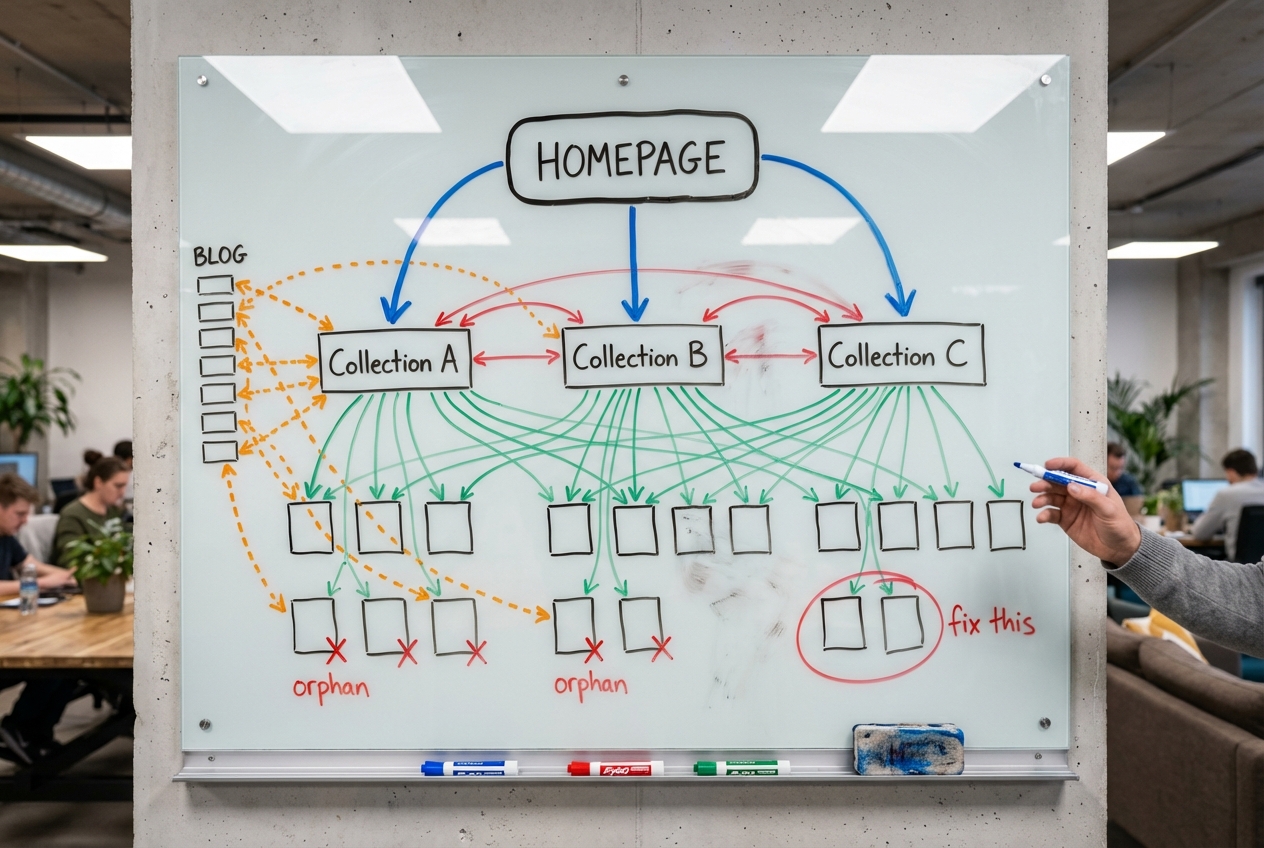
Five Places Every Collection Needs Links From
Main navigation. Top collections in the primary menu, with keyword-relevant anchor text. Use mega menus for secondary collections organised by type, material, colour, use case.
Homepage. Your highest-authority page. Feature your most important collections here. Links from the homepage carry the most weight of any page on your site.
Footer. Secondary and tertiary collections that don’t fit in the main nav. This is real estate most stores waste on policy pages and social links.
Blog posts. Every blog post should contain at least one contextual link to a relevant collection. Not “click here to shop.” A natural link woven into a sentence: “if you’re comparing GPS tracking options, we carry five brands in our range with real-time tracking and geofencing.” Target roughly 3 contextual links per 100 words of blog content.
Other collection pages. At the bottom of each collection, cross-link 3-4 related collections. “Men’s Watches” links to “Waterproof Watches,” “Diving Watches,” “Luxury Watches.” Use visual components, icons or pill-style buttons, so these feel like navigation rather than an afterthought.
Product Pages Linking Back Up
Most internal linking flows downward: collection to product. But linking back up from product pages to their parent collection is just as important, and most stores don’t do it.
A “Related categories” or “Shop more from this collection” section on product pages creates thousands of internal links across your store with a single implementation. Every product pointing back to its category, reinforcing to Google which collection that product belongs to.
The Click Depth Rule
No collection page should sit more than 3 clicks from the homepage. Deeper than that and Google treats it as less important. Flatten your architecture with breadcrumbs, mega menus, and direct links from high-authority pages.
And the internal linking golden rule: always link to canonical URLs. Never to /collections/name/products/product-name. Always to /products/product-name. We’ve covered why this matters in detail.
Sub-Collections: 10x Your Keyword Coverage
This is the biggest growth lever for collection page SEO. Most stores haven’t touched it.
One set of 20 products described in 5-10 different ways creates multiple ranking opportunities for the same inventory. Products can exist in as many collections as they’re relevant to with zero SEO penalty.
The Numbers
Take a single category like “cushions.” The head term gets roughly 31,000 monthly searches. Solid. But cluster the related long-tail terms and you find hundreds of sub-collection opportunities: “green cushions,” “velvet cushions,” “round cushions,” “outdoor cushions,” “lumbar cushions,” “cushions for back pain,” “boho cushions.”
Those sub-collections collectively represent 300,000+ monthly searches. Ten times the traffic from the same products, described differently.
We see it in every niche. “Dog collars” opens up “GPS dog collars,” “leather dog collars,” “personalised dog collars,” “small dog collars.” Each is a separate search query with volume and buying intent. Each deserves its own collection page.
Building the Taxonomy
Create collections for every meaningful variant your customers search for:
- Type: Running shoes, trail shoes, walking shoes
- Material: Leather sofas, fabric sofas, velvet sofas
- Colour: Black dresses, red dresses, white dresses
- Size: King beds, queen beds, single beds
- Use case: Office chairs, gaming chairs, dining chairs
- Season: Winter coats, summer dresses, spring jackets
- Feature: Waterproof jackets, insulated jackets, lightweight jackets
- Brand: Nike running shoes, Adidas running shoes (if multi-brand)
The more granular your collections, the more long-tail keywords you capture. And long-tail collection pages convert at higher rates because the visitor’s intent is more specific. Someone searching “round velvet cushions” knows what they want. Someone searching “cushions” is still figuring it out.
The common objection: won’t overlapping collections cannibalise each other? Not if you link them properly. When a parent collection links down to its sub-collections and those sub-collections link back up, you’re building a topic cluster. Google reads that as one interconnected entity, not competing pages. Cannibalisation happens when sub-collections sit as orphans with no linking hierarchy. The fix isn’t fewer collections. It’s better architecture between them.
Validating Demand Before You Build
Not every variant deserves its own collection.
Google auto-suggest is the quickest check. Type the variant name. If Google completes it, there’s demand. If nothing comes up, the volume probably isn’t there.
Search results comparison. If Google returns identical results for two variants (“blue cushions” vs “navy cushions”), they’re targeting the same intent. Pick one.
Product count. Each collection needs at least 3-5 products. A collection with one product looks thin and doesn’t give Google enough to work with.
What Each Sub-Collection Needs
A clean URL (/collections/green-cushions), a unique H1 and title tag, a unique meta description, 200-300 words of description content that’s not copied from the parent, and internal links to parent and sibling collections. Same schema markup as your main collections.
Don’t create “Shop All” style pages. They’re the least effective for SEO because they target nothing specific. Granular beats broad.
Schema Markup for Collection Pages
Most Shopify themes have Product schema on product pages but nothing on collection pages. Three schema types belong here:
CollectionPage + ItemList. Tells Google this is a product listing page and defines the products within it: position, name, URL, price, availability. ItemList makes your collection eligible for Google’s mobile carousel in search results.
BreadcrumbList. Reinforces the hierarchy from Home to Category to Sub-category. Important because Shopify doesn’t have native parent/child relationships between collections. Breadcrumb schema, paired with visible breadcrumbs on the page, signals your site structure.
FAQPage. If you’ve added FAQ accordions below your product grid, mark them up with FAQPage schema for potential rich snippet display.
Check your theme’s existing schema before adding anything new. Duplicate structured data creates problems, not benefits. Our SEO audit checklist covers how to audit and clean up schema across your store (check #23-29). Always validate with Google’s Rich Results Test before going live.
Fixing Shopify’s Default Collection Page Problems
Shopify creates several SEO issues on collection pages out of the box. Product grid links pointing to the wrong URL. Tag pages creating duplicate content. Filter parameters wasting crawl budget. Pagination canonicals left to chance.
We’ve written the full technical breakdown with all the fixes in our duplicate content guide. Get those changes in place before investing time in content and sub-collections. The technical foundation has to be solid or the content work won’t reach its potential.
The short version: collection grids link to non-canonical product URLs by default (fix in the theme), tag pages should be noindexed, filter parameters should be blocked in robots.txt, and pagination should canonical back to the base collection URL. We’ve tested both pagination approaches and get better results with consolidation, even though it goes against Google’s official recommendation. The reasoning: Shopify paginated pages all share the same H1 and meta. There’s nothing unique on page 3.
CRO Meets SEO: Conversion Tactics on Collection Pages
Rankings are half the job. A collection page that ranks #1 but doesn’t convert is still costing you money. These changes improve both engagement signals (which feed rankings) and actual sales. For the full conversion picture, we’ve covered what to do when your store isn’t converting and product page fixes separately. This section is specific to collection pages.
Ditch the hero banner. Big lifestyle banners push products below the fold. On mobile (80%+ of retail traffic), a full-width banner means scrolling before seeing a single product. Your short intro text above the grid gives Google and shoppers the context they need without burying the products.
2x2 product grid on mobile. Single-column grids waste screen space. Two columns gets four products visible in the first viewport. More products visible, more chance something catches attention.
Pill filter buttons over nested dropdowns. Traditional filters take 3 clicks: open menu, select category, choose option. Pill-style buttons above the product grid reduce that to one click. For stores without enormous SKU counts, the difference in conversion is measurable.
Selective product labels. “Best Seller.” “New In.” “Low Stock.” Labels on a handful of product cards create visual hierarchy. Don’t label everything. When every card has a badge, none of them stand out. The same logic applies to checkout optimisation: reduce noise, surface what matters.
Short descriptions on product cards. For categories where products look the same (skincare, supplements, food), a one-line description on the card helps shoppers tell items apart without clicking through each one.
Building Backlinks to Collection Pages
Most link building targets the homepage. Collection pages, the pages targeting your most valuable keywords, get nothing.
Direct some external link building to collection pages specifically. Guest posts, link insertions, digital PR, all with varied anchor text pointing to the collection URLs you want to rank. The return on a backlink to a collection page is often higher than another link to an already-authoritative homepage. That’s where the ranking potential sits.
Internal links can compensate for weak backlink profiles to a degree. But for competitive keywords, you’ll eventually need external authority flowing directly to the pages you want to rank.
Scaling Across Large Catalogs
Stores with 50-100+ collections can’t hand-write descriptions for every page individually. The approach that works: keyword research per collection first, then batch content creation in a spreadsheet, then bulk upload via Matrixify.
The critical step most people skip: human editing everything before it goes live. Google doesn’t penalise AI content. It penalises useless content. And most AI-generated collection descriptions are useless. They read like a Wikipedia entry for “Shoes.” Generic category facts that could describe any store on the internet. That won’t rank, and it won’t sell.
Your collection descriptions should sound like a salesperson standing in a physical store. “These run a size large, the navy sells out every winter, and if you’re between sizes go up.” That’s the kind of specificity Google rewards and AI can’t generate on its own. Every description needs a human pass for brand voice, real product knowledge, and the details that signal you actually know what you’re selling.
Allow 20-30 days after publishing before evaluating performance in Search Console. Collection pages don’t rank overnight. Optimise based on real data, not assumptions.
FAQ
How much content should a Shopify collection page have?
50-100 words above the product grid and 200-500 words below it. For competitive keywords, the below-grid section can go up to 1,000 words. The above-grid content matters more for rankings. Focus on making every word useful, not on hitting a word count.
Do collection pages rank better than product pages?
For broad, high-volume commercial keywords, yes. Collection pages match category-level search intent. Product pages rank for specific product names and model numbers. Both matter. But collection pages capture the traffic with more volume and more buying intent.
How many sub-collections should I create?
As many as the data supports. If Google auto-suggest completes the variant name and the search results differ from the parent collection, it’s worth building. Each sub-collection needs at least 3-5 products and unique content.
Can the same product be in multiple collections?
Yes. No SEO penalty. A blue waterproof jacket belongs in “Waterproof Jackets,” “Blue Jackets,” “Winter Jackets,” and “Men’s Outerwear.” Each collection targets a different keyword with the same inventory.
Should I use infinite scroll or pagination?
Pagination. Google can crawl paginated pages but can’t scroll. Infinitely loaded content is invisible to search engines. Use numbered pagination buttons (1, 2, 3) rather than just Previous/Next to reduce click depth to products on later pages.
Collection pages are the most underleveraged pages on most Shopify stores. The same inventory, properly organised and described, can capture 10x the organic traffic.
If you want us to audit your collection pages and build a sub-collection strategy for your store, book a strategy call. We’ll show you where the gaps are and what fixing them is worth in revenue.
Keep Reading
- Shopify URL Structure: Fix Duplicate Content, the technical foundation for everything Shopify breaks by default on collection pages
- Shopify SEO Audit: 51-Point Checklist, the full audit we run on every new client, including collection page checks
- Shopify Product Page SEO: Title Tags, Meta Descriptions & H1s That Rank, SEO for individual product pages (long-tail keywords, not the commercial terms collection pages target)
- Shopify Product Page: 12 Add-to-Cart Fixes, what to optimise after they click through from the collection
- Why Your Shopify Store Isn’t Converting, diagnose which layer of your funnel is broken before changing anything
- Shopify Internal Linking Strategy, the full guide to building authority across your store through internal links