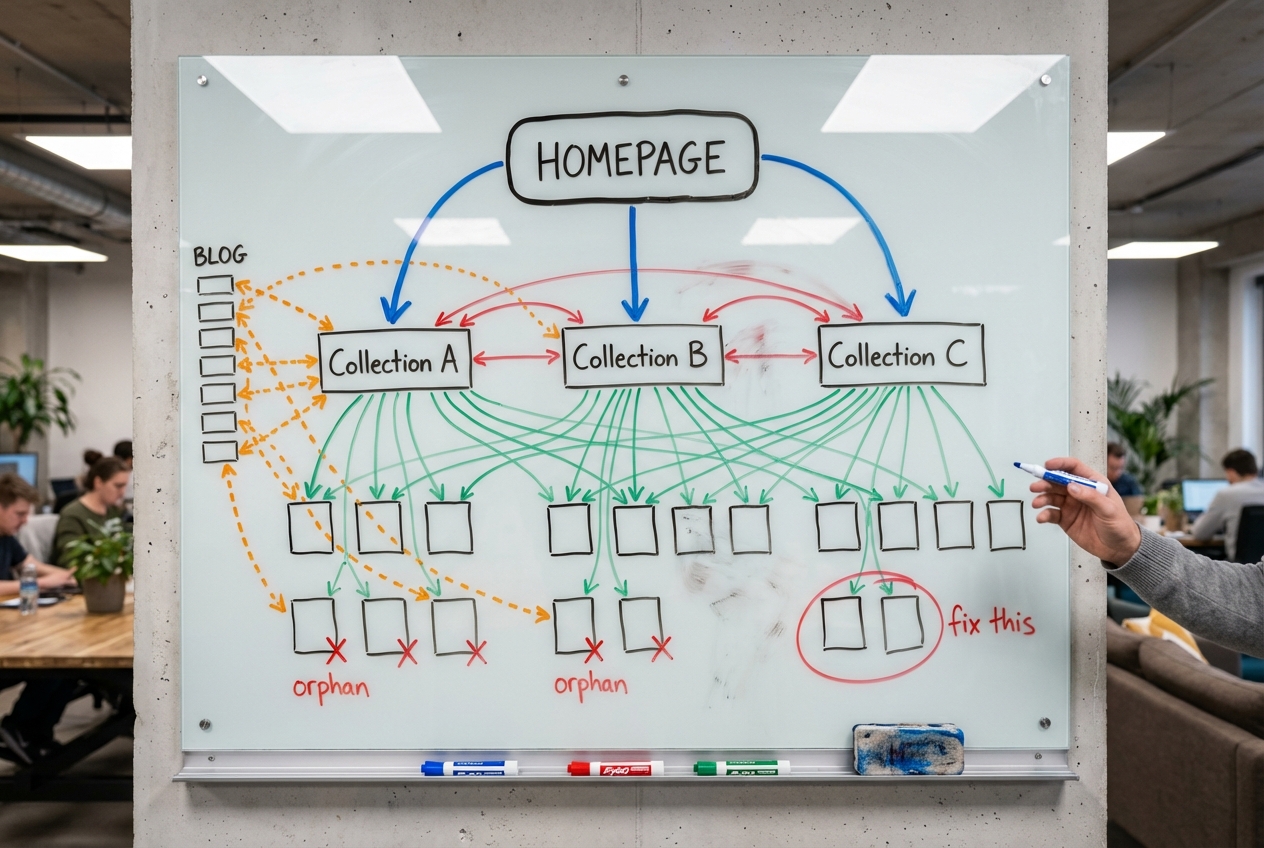
Open Screaming Frog. Crawl your Shopify store. Pull up the “Unique Inlinks” column and sort ascending. In plain English: this shows you how many other pages on your site link to each page. We’d bet money your most important collection pages have fewer internal links pointing to them than your returns policy page. Your “Refund Policy” is telling Google it’s more important than your “Summer Dresses” collection, because you link to it from every single footer on your site.
We see this on almost every Shopify store we audit. Hundreds of products, dozens of collections, a blog pumping out content. And the internal links? A navigation menu with identical anchor text on every page. A few breadcrumbs. That’s it. No contextual links in blog posts pointing to collection pages. No product pages linking back up to their parent collections. No cross-links between related collections.
Meanwhile, the store owner is spending thousands on backlinks when the free authority sitting inside their own site isn’t being distributed.
Internal linking is the single highest-ROI SEO change you can make. Not opinion. Screaming Frog compiled data across hundreds of controlled tests and found that 80% of internal linking changes produced positive results, averaging a 173% increase in clicks. No other on-page change comes close to that hit rate.
Here’s how we approach it for Shopify stores. And why Shopify makes this harder than it needs to be.
Why Internal Linking on Shopify Is a Different Problem
On WordPress or a custom build, you write content, you link pages together, the URLs make sense, and equity flows where you point it. Simple.
Shopify breaks this in ways most store owners never discover.
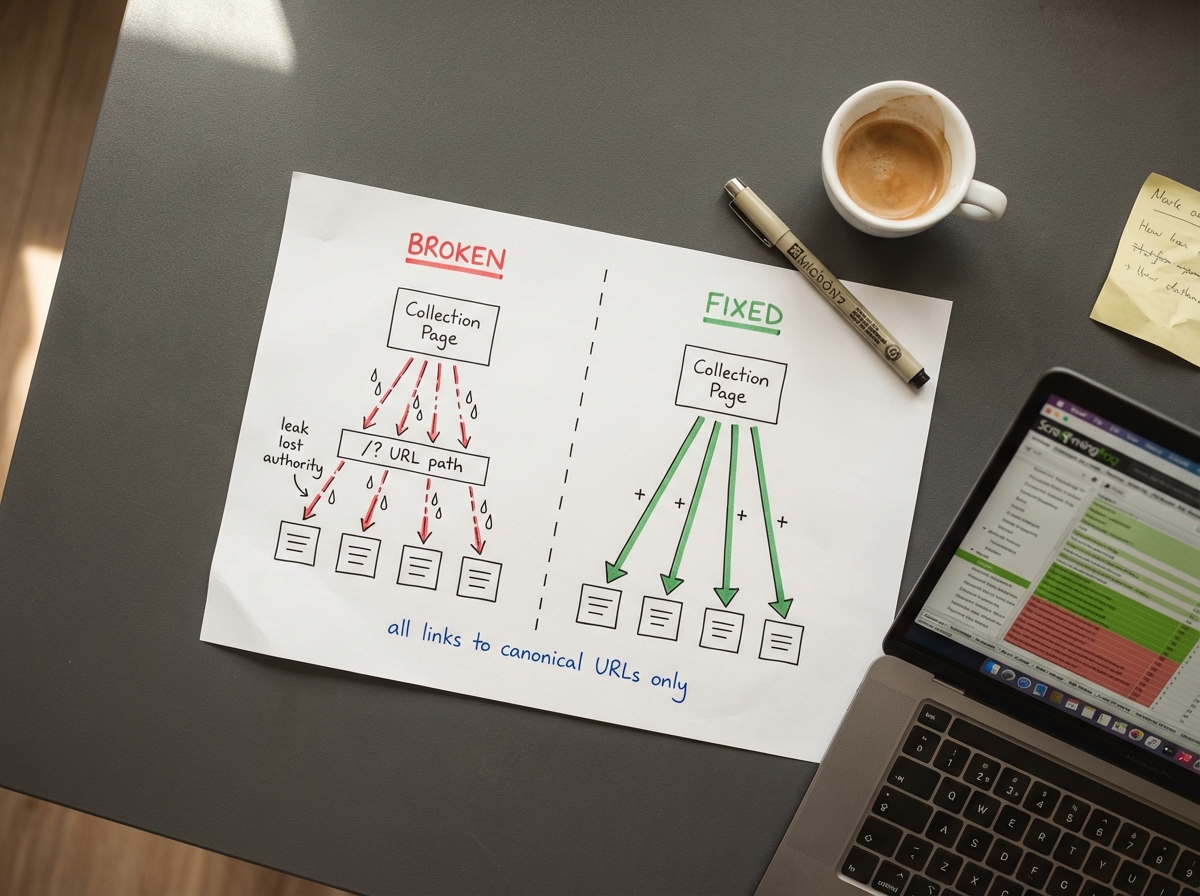
Your collection pages link to the wrong product URLs. Every Shopify theme ships with a Liquid filter that generates collection-scoped product URLs. A product in three collections has four crawlable URLs: the canonical /products/blue-widget plus /collections/summer/products/blue-widget, /collections/sale/products/blue-widget, and /collections/all/products/blue-widget. Your collection grids link to the non-canonical versions.
Think of it like this. You have one real product page. But Shopify creates three fake doors to it, one from each collection. Every internal link on your site points to the fake doors. The real door, the one you want Google to rank, has zero links pointing to it. It’s an orphan. Ahrefs Site Audit flags this as “Canonical URLs have no incoming internal links.” We cover the full technical fix in our duplicate content guide.
No hierarchical URL structure. You can’t build /clothing/shirts/blue-tee on Shopify. Everything lives under flat mandatory prefixes: /products/, /collections/, /pages/. On platforms with nested URLs, the URL path itself communicates hierarchy. On Shopify, internal linking is the only way to tell Google which pages sit above or below others.
Breadcrumbs change depending on how someone arrived. Visit a product through one collection and the breadcrumb says “Home > Dog Food > Product.” Visit through another collection and it says “Home > Dry Dog Food > Product.” Same product, different internal link signals every time. Inconsistent breadcrumb paths dilute the equity that should consolidate on one canonical trail.
Faceted navigation creates URL bloat. Filter parameters like ?filter.v.option.color=red generate a new crawlable URL for every combination. Server log analysis typically shows a third or more of Googlebot’s crawl activity going to these parameterised duplicates instead of your real pages.
On Shopify, internal linking isn’t just an SEO tactic. It’s the primary mechanism for communicating your site hierarchy to Google. The URL structure can’t do it for you.
How Internal Links Move Rankings (and What Doesn’t Work)
Most internal linking advice is vibes. “Add more links.” “Use keyword-rich anchors.” Sure, but how many links? Which anchors? Where?
We’ve tested this across our own client stores and tracked the results against larger industry datasets. A study by Zyppy that analysed 23 million internal links across 1,800 websites confirmed what we were already seeing in our work. Here’s what matters.
Anchor text variety beats link quantity. The correlation between varied anchor text and organic traffic climbs with no ceiling. Raw link count plateaus after 20-30 links per page. Diversifying your anchors beats adding more links of the same type. We build anchor text libraries for every client, with five or six variations per target page, and rotate through them.
Aim for 10 internal links from different pages. Traffic correlation rises steeply up to about 10 unique referring pages, then flattens. Below 10, every additional link moves the needle. Above 10, diminishing returns. So if your key collection page only has 3 internal links pointing to it, getting to 10 is the priority. Not getting from 15 to 25.
Navigation links barely register. Identical anchor text repeated across every page on your site provides one signal, regardless of volume. Your mega menu linking to “Men’s Shoes” from 400 pages counts roughly the same as one contextual link in a blog post. Body-content links with varied anchors are what move rankings. This is why we focus so heavily on in-content links over navigation structure.
First link on the page gets priority. When multiple links point to the same destination, Google primarily counts the anchor text of the first one. We place the most important internal link early in the content. Not in a “related posts” widget at the bottom.
Internal linking doesn’t cause cannibalisation. We hear this fear from store owners constantly: “Won’t linking these two collection pages together make them compete?” No. The data shows the opposite. They reinforce each other. Linking multiple pages together with keyword-rich anchors improves rankings for all of them. Not some of them. All of them.
Here’s our working benchmark: 4-6 internal links from high-traffic pages deliver roughly the same ranking boost as one quality backlink. Free authority sitting inside your own site, waiting to be pointed in the right direction.
Spread Authority Across Your Store, Not Just to the Homepage
There are two internal linking models, and most guidance online teaches the wrong one for ecommerce.
Centralised linking funnels all equity toward one or two conversion pages. That works for SaaS companies with a single pricing page. Terrible for ecommerce.
Decentralised linking distributes equity across many conversion points. This is what online stores need. Your conversions happen everywhere, across dozens of collection pages and hundreds of product pages. Every collection page is a potential landing page from Google. Concentrating all your link equity on the homepage while starving your collection pages is the ecommerce equivalent of putting all your stock in the window display and leaving the shelves empty.
What we recommend: link to revenue-driving products in the top navigation. Main categories below that. Subcategories in the footer. And test showing more products per page (40 instead of 20) to increase the number of internal links flowing to product pages from each collection.
How to Unstick a Collection Page That Won’t Rank
This is the most actionable internal linking tactic in our toolkit for getting collection pages moving.
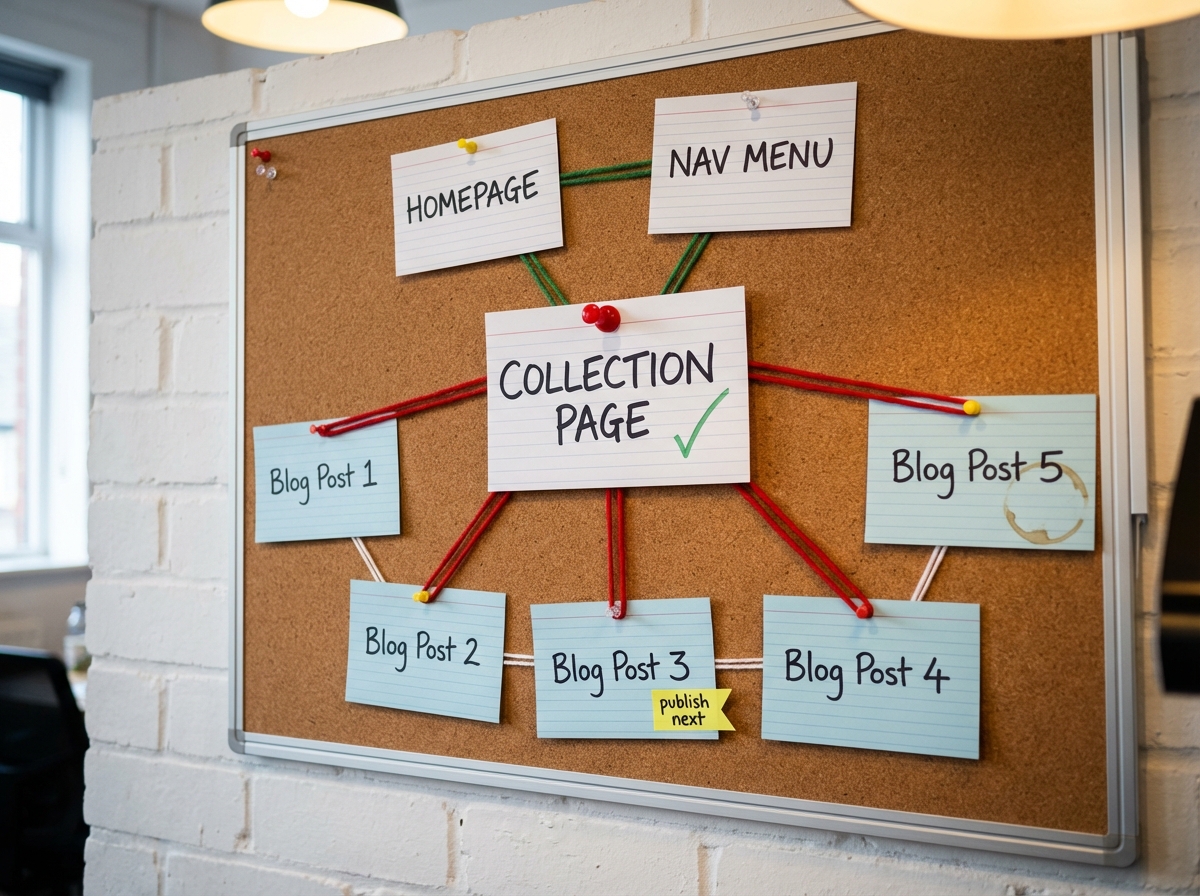
A virtual silo is a group of 3-5 supporting blog posts that exist to boost one target page. The structure is dead simple.
Every supporting post links to the target page, your collection or product page that you want to rank higher. Each supporting post also links to 1-2 other posts within the silo. No cross-silo links to unrelated pages. The most important link sits near the top of each post, not buried at the bottom.
That’s it.
We’ve used this on client stores where a collection page was stuck at position 12-15 for a competitive keyword. Write 3-5 blog posts answering the “People Also Ask” questions around that keyword. Each post links to the collection page with varied anchor text. Each post interlinks with the others. The collection page climbs. We’ve seen pages jump from mid-teens to page 1 without building a single external link, just by structuring internal links this way.
One warning here. The “varied anchor text” part is not optional. We’ve seen store owners get excited about this tactic and then link all five blog posts to the collection page using “Men’s Leather Boots” as the anchor text every single time. That looks like a robot wrote it, and Google treats it accordingly. Instead, rotate: “these waterproof boots,” “our leather range,” “this durable footwear,” “the full collection.” Same destination, different language each time. If your anchor text reads like a keyword stuffing exercise, you’ll do more harm than good.
The approach has been validated independently by SEOs running controlled tests on affiliate and ecommerce sites. One case study showed a six-year-old site that couldn’t rank a review page. Four supporting articles, each linking to the target. Ranked within two weeks. No backlinks. Just internal links.
We pair this with our broader collection page SEO work whenever we take on competitive category terms.
What Anchor Text to Use (and How to Rotate It)
Anchor text distribution for internal links, based on our testing and what we’ve seen hold up across client stores:
- 40% branded or URL anchors. Your store name, naked URLs, or generic brand references.
- 20% topic anchors. Partial-match phrases related to the target keyword.
- 20% target keyword anchors. Exact-match or near-exact of the keyword you’re targeting.
- 20% miscellaneous. Long-tail variants, natural-language phrases, action-oriented CTAs.
Pages with at least one exact-match anchor get roughly 5x more traffic than pages without any. But repeating the same exact-match anchor across multiple links hurts you. You need the exact match. You also need variety around it.
When you add internal links, write new sentences around them. Don’t just highlight existing text and bolt on a hyperlink. Rewording a paragraph to work in a link creates a freshness signal. Bolting links onto existing text looks automated, because it usually is.
Build an anchor text library for each target page. Five or six variations you rotate through. The collection name, two or three long-tail keyword variants, one action CTA (“shop our waterproof hiking boots”), one contextual phrase. Never use the same anchor twice on the same page.
Where to Place Internal Links on Your Shopify Store
Collection Pages
Your highest-priority linking location. Collection descriptions should link to 3-4 related collections and any relevant blog content. Cross-link sibling collections at the bottom. “Women’s Hats” links to “Women’s Visors,” “Women’s Caps,” “Sun Hats.” Link from parent collections down to sub-collections. If you’ve built out a sub-collection strategy, those parent-to-child links are what make the hierarchy work.
Product Pages
Link back up to parent collections. Most stores only link downward, collection to product. Linking back up from product pages to their parent collection creates thousands of internal links with a single template change. Add a “Shop more from this collection” section that displays every collection the product belongs to. Also link to relevant blog content: size guides, care instructions, how-to articles. Target 5-15 contextual internal links per product page beyond the standard navigation.
Blog Posts
This is where most of your contextual, varied-anchor internal links should live. Every blog post needs at least 1-2 links to collection pages and 1-2 to relevant products. Aim for 2-5 internal links per 1,000 words. Place them in three tiers: near the top for early-intent readers, mid-post during evaluations or comparisons, and at the end as conversion-focused CTAs.
The step most people skip: when you publish a new post, go back to 2-5 existing posts and add links pointing to the new one. Don’t just link outward from new content. Link inward from old content. We do this on every post we publish for clients. New pages with zero inbound internal links are invisible to Google until the next full crawl, which could be weeks.
Homepage
Your highest-authority page. Link from homepage content sections to your most important collections. Every link from the homepage carries more weight than links from any other page on your site. Don’t waste this real estate on navigation alone. Add contextual links in content blocks, featured collection sections, and seasonal spotlights.
Navigation
Be selective. John Mueller has said directly: “The more links you have on a page, the less value they pass.” A mega menu listing every collection dilutes equity across all of them. Put your highest-value categories in the main navigation. Secondary collections in the footer. Don’t list everything just because you can.
The Three-Click Rule
No money page should sit more than three clicks from the homepage. Google treats deeper pages as less important, and crawl frequency drops off steeply past depth three.
On Shopify, flatten your architecture with: header links to main collections, collection descriptions linking to sub-collections, related product sections on product pages, blog posts bridging distant pages, and numbered pagination (1, 2, 3, 4, 5) instead of just Previous/Next.
Monitor this with Screaming Frog’s crawl depth report. Filter for anything at depth four or beyond. If important collection or product pages are buried that deep, add links from higher-authority pages to pull them up. Our SEO audit checklist covers this as check #31.

Your “You May Also Like” Section Is Doing Double Duty
Most stores think of “You May Also Like” and “Frequently Bought Together” sections as conversion tools. They are. They’re also internal linking.
Every related product link creates a pathway between product pages, distributing link equity across your catalogue. And the conversion side compounds the SEO benefit. Stores with well-structured cross-selling sections see higher average order values and longer sessions, because shoppers who click through to a second or third product are already signalling buying intent. SEO and conversions pulling in the same direction.
Two things to watch. Use Shopify’s native Search & Discovery app for related products, not JavaScript-only recommendation widgets. JS-only widgets aren’t crawlable by Google. The links exist for shoppers but are invisible to search engines. And make sure related product links use canonical /products/ URLs, not the collection-scoped versions.
Vary the labels on these sections. “People Also Viewed.” “Pairs Well With.” “Complete the Look.” Each label creates different surrounding text for the internal links, which feeds anchor text variety.
Why Nofollow on Internal Links Wastes Your Authority
Some SEO guides still recommend adding nofollow to internal links on less important pages to “sculpt” PageRank toward your money pages. This hasn’t worked in years.
The math is simple: if you have $10 in authority to spend on ten links and you nofollow five of them, the other five don’t get $2 each. The equity allocated to nofollowed links is wasted, not redistributed. You end up with less total authority flowing through your site.
The right approach is to concentrate links, not block them. Reduce the total number of links on a page to increase equity per remaining link. SearchPilot ran a controlled split test on this. Reducing the number of links in a link block improved rankings for the remaining linked pages. Focused equity beats diluted equity.
And check your theme files. Many pre-built Shopify themes hardcode nofollow on internal navigation links without documenting it. If your nav links are nofollowed, you’re leaking authority on every page of your store.
How to Find and Fix Broken Internal Linking
Run Screaming Frog with Google Search Console and GA4 integrations enabled. Export the “All Inlinks” report. Here’s what to look for.
Orphan pages. Pages with zero or very few internal links. On Shopify, your canonical product URLs are usually the worst offenders because collection grids link to the /collections/x/products/y version instead. Fixing the theme template resolves this at scale.
Link equity hoarders. Pages receiving lots of internal links but not linking out to anything. These absorb authority without distributing it. Add contextual outbound links from high-authority pages.
Pages ranking positions 5-15. These are your biggest opportunities. Close enough to page 1 that a few well-placed internal links can push them over. Cross-reference your crawl data with GSC position data. Find pages ranking 5-15 with fewer than 10 internal links pointing to them. Add links from your highest-authority pages.
Broken internal links. 301 redirect changed URLs. Replace dead links to deleted products. Make sure redirects point to genuinely relevant pages. Google has confirmed that irrelevant redirects cause link equity to “evaporate.”
Run light checks monthly. Full audits quarterly or after major content launches.

Seven Internal Linking Mistakes We See on Every Shopify Store
Relying on navigation alone. Your mega menu uses the same anchor text on every page. That’s one signal, repeated hundreds of times. You need contextual body links with varied anchors.
Same anchor text everywhere. Anchor text variety is the strongest correlate with organic traffic in every dataset we’ve looked at. Stronger than link quantity. Rotate your anchors.
Blog sitting in isolation. Your blog should aggressively link to collection and product pages. And your product pages should link back to relevant blog content. Most Shopify stores treat the blog as a separate entity. It shouldn’t be.
Linking to non-canonical URLs. Always /products/product-handle. Never /collections/name/products/product-handle.
Ignoring new content. Publishing a blog post and not going back to add links to it from existing pages. The new post exists in a vacuum until Google discovers it through the sitemap crawl, which could be weeks.
Making site-wide changes without testing. Internal linking changes can hurt as well as help. Test on a subset of pages first. Wait 2-4 weeks. Measure. Then roll out.
JavaScript-only product grids. Third-party apps that render product links via JavaScript aren’t crawlable. Use Shopify’s native tools or ensure server-side rendering.
FAQ
How many internal links should a Shopify product page have?
5-15 contextual links beyond the standard navigation. Link to parent collections, complementary products, and relevant blog content. The biggest traffic gains come from having at least 10 links from different pages with varied anchor text.
Do internal links help as much as backlinks?
Different levers, but closer than most people think. Our working benchmark is that 4-6 internal links from high-traffic pages deliver roughly the same ranking impact as one quality backlink. Except internal links are free, take effect faster, and you don’t need anyone’s permission to place them. For most Shopify stores we work with, fixing internal linking moves rankings quicker than a link building campaign.
Should I use a Shopify app for internal linking?
Apps like InterLinks and Link Whisper can automate keyword-based linking across your store. Useful for stores with hundreds of blog posts and products. But automation without strategy creates noise. Build your linking architecture manually first (silos, anchor text libraries, priority pages), then use apps to fill gaps at scale.
How often should I audit my internal links?
Light monthly checks for broken links and orphan pages. Full quarterly audits with Screaming Frog. Run a targeted audit after any major change: theme updates, large product catalogue additions, or new blog content clusters.
Can too many internal links hurt rankings?
Yes. John Mueller has confirmed that the more links on a page, the less value each one passes. SearchPilot’s controlled test showed that reducing links in a link block improved rankings for the remaining linked pages. Be intentional. Link to what matters, not to everything.
Nobody gets excited about internal linking. There’s no dopamine hit like watching a backlink land or a new page index. But six months from now, the store that spent an afternoon restructuring its internal links will be outranking the store that spent thousands on guest posts. We’ve watched it happen. The compounding is real. Every link you place today makes the next piece of content you publish slightly stronger, and the one after that stronger still.
If you want us to audit your store’s internal linking and build a strategy around it, book a strategy call. We’ll pull up your Screaming Frog data live and show you exactly where authority is leaking, and what fixing it is worth in traffic. The same architectural work applies whether you’re on Shopify, WooCommerce, BigCommerce, or Magento — see our e-commerce SEO Auckland service for the full platform-agnostic process.
Keep Reading
- Shopify Collection Page SEO: The Overlooked Revenue Driver, collection pages are the primary target for internal links
- Shopify URL Structure: Fix Duplicate Content, fix the canonical URL problem before internal linking can work properly
- Shopify SEO Audit: 51-Point Checklist, the full audit we run on every client, including internal link checks
- Shopify Product Page SEO: Title Tags, Meta Descriptions & H1s That Rank, get your product pages ranking before you optimise them for conversions
- Shopify Product Page: 12 Add-to-Cart Fixes, optimise the pages your internal links point to