Run a Screaming Frog crawl on your Shopify store. Go on, do it right now. If you have 500 products, you’ll find somewhere between 5,000 and 10,000 crawlable URLs staring back at you. Sometimes more.
Not a bug. That’s Shopify working as intended.
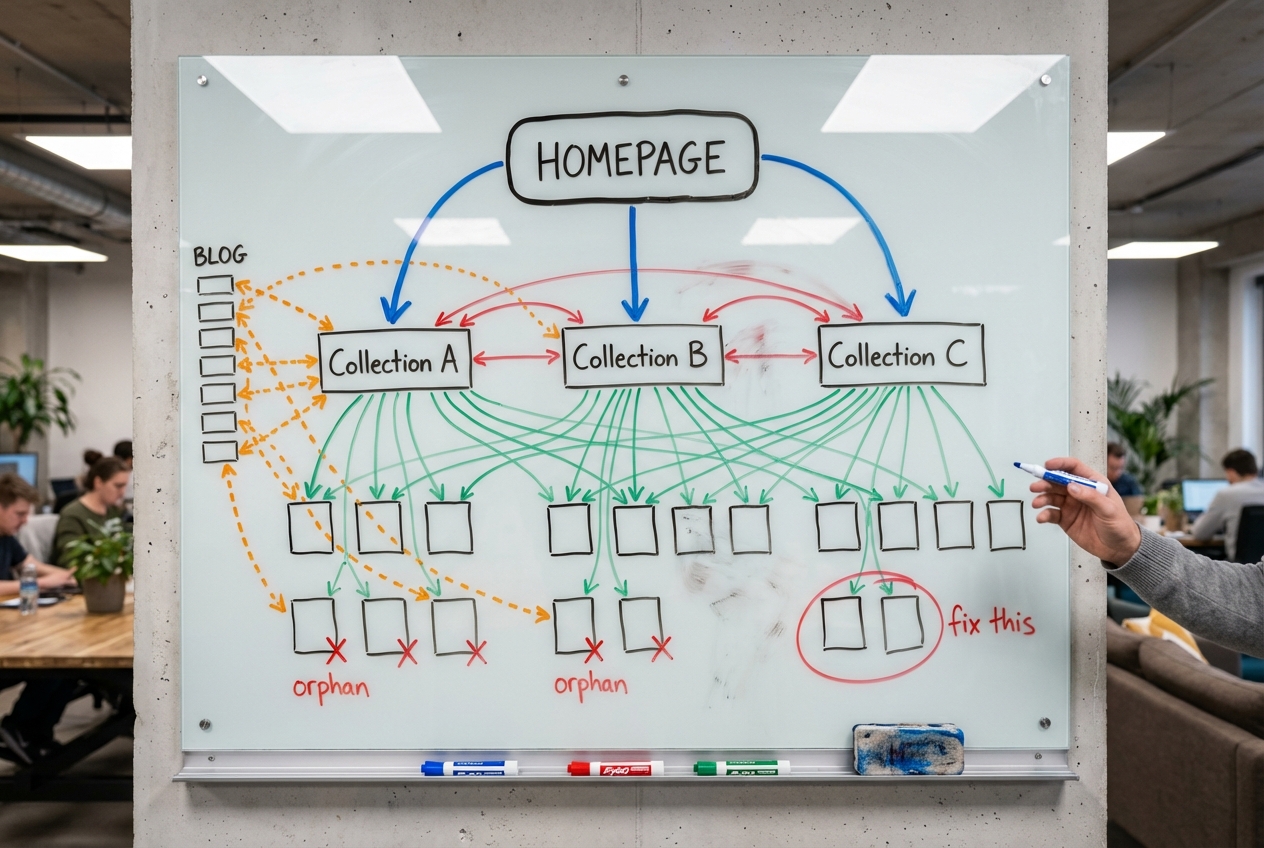
Every product in your store gets a clean URL (/products/blue-widget) plus a separate URL for every collection it belongs to (/collections/summer-sale/products/blue-widget). One product in four collections? Five distinct URLs, all serving the exact same page content.
One store owner posted on the Google Search Central forum about this. They had around 500 products. Search Console was showing over 12,000 “Alternate page with proper canonical tag” entries. A 24:1 ratio of alternate URLs to real products. And that’s not even the worst of it. Shopify developer Eduard Fastovski documented a store with roughly 200 products that had accumulated over 1 million discovered URLs, almost all from Shopify’s own product recommendation tracking parameters.
Now, before you spiral: there is no duplicate content penalty. John Mueller from Google has confirmed this more than once. Google’s systems handle duplication fine.
The damage is subtler than a penalty. Link equity gets split across multiple URLs instead of consolidating on one page that could rank well. Your internal linking strategy falls apart when the links point to the wrong URLs. Google sometimes picks the wrong URL to show in search results, displaying /collections/sale/products/blue-widget when you want /products/blue-widget ranking. For stores with hundreds of products spread across multiple collections, these effects stack up. Not a penalty. Just slow, compounding authority loss.
Let’s get into each source and the fixes.
Why Does Your Shopify Store Have 10x More URLs Than Products?
Eight separate sources of duplicate URLs exist in Shopify. Some get talked about a lot. Others, almost nobody covers.
1. The Dual URL Problem
This is the one that matters most.
Every product on Shopify has two URL types:
- Clean URL:
/products/blue-widget - Collection-scoped URL:
/collections/summer-sale/products/blue-widget
Product sits in three collections? That’s four URLs for a single product. Five hundred products averaging three collections each creates 2,000 crawlable product URLs minimum. For a 500-product store.
And here’s the part that gets us. The root cause is one line of Liquid code that ships in most Shopify themes. Dawn (Shopify’s own reference theme) includes it:
<a href="{{ product.url | within: collection }}">The | within: collection filter appends the collection path to every product link on collection pages. Whenever a customer clicks a product from a collection grid, they land on the collection-scoped URL. Not the canonical.
Shopify does add a canonical tag pointing back to /products/blue-widget. But canonical tags are hints. Not directives. Google uses roughly 40 different signals when deciding which URL to treat as canonical (Gary Illyes talked about this on the Search Off The Record podcast). When every internal link on your entire site points to the non-canonical version, you’re sending Google one signal through the canonical tag and the opposite signal through your link structure.
Google listens to the tag sometimes. Other times it doesn’t. When it doesn’t, you get collection-scoped URLs competing against your clean product URLs in search results.
2. The pr_prod_strat Tracking Parameter Explosion
This one blindsides people because Shopify’s own features cause it.
The “Recommended Products” and “You May Also Like” sections tack tracking parameters onto product URLs:
/products/blue-widget?pr_prod_strat=use_description&pr_rec_id=f50a47009&pr_rec_pid=4703513280571Google finds these parameterised URLs and tries to crawl every single one. One store owner reported 80,000 new pages discovered from these parameters alone. Fastovski’s case study? A store with around 200 products was sitting on over 1 million indexed pages and 4.5 million non-indexed pages. Almost all of it from recommendation tracking URLs.
Shopify’s own features. Generating the bloat.
3. Tag Page URLs
Shopify creates a page for every product tag used in a collection, automatically:
/collections/shoes/waterproof/collections/shoes/size-10/collections/shoes/red
Each tag page uses a self-referencing canonical tag. It does not canonicalise back to the parent collection. It reuses the same H1, meta title, and meta description as the parent collection. Twenty collections with 50 tags across them? That’s over 1,000 thin tag pages with near-identical content.
4. Pagination Duplicates
Two separate issues. First: /collections/shoes and /collections/shoes?page=1 serve identical content. Shopify does not canonicalise the ?page=1 variant to the base URL. That’s just a free duplicate for every collection with pagination.
Second: Google revealed in March 2019 that they’d stopped using rel=next/prev as an indexing signal years before the announcement. Paginated pages get zero special treatment. Each one competes on its own in search results, usually with the same H1 and meta description as page 1.
5. Variant URL Parameters
Product variants generate URLs like /products/blue-widget?variant=12345678. Credit where it’s due: Shopify handles this correctly. The canonical tag strips the variant parameter and points to the parent product URL.
The trade-off is that variants with their own search demand (someone searching “red Nike Air Max” versus “blue Nike Air Max”) can’t rank independently. If that’s your situation, build them as separate products rather than variants. (For more on making each product page count, see our guides to product page SEO and product page conversion optimisation.)
6. Filter and Sort Parameters
Collection filtering produces URLs like /collections/shoes?sort_by=price-ascending or /collections/shoes?filter.v.availability=1. Third-party filter apps compound the problem by creating a crawlable URL for every filter combination a customer could select.
Shopify’s default robots.txt blocks sort_by parameters. It does not block filter parameters.
7. The /collections/all Page
Shopify auto-generates a page listing every product in the store. No unique H1. No unique meta description. A product grid and nothing else. A 500-product store at 24 products per page ends up with 21+ paginated URLs from this single collection, all sharing identical metadata.
8. Blog Tag Pages
Blog tags create URLs like /blogs/news/tagged/seo-tips. Same meta title and description as the parent blog listing page. Self-referencing canonical. Duplicate metadata stacking up across every tag you’ve ever used.
Why Shopify’s Canonical Tags Aren’t Enough
Most advice on this stops at “Shopify adds canonical tags automatically, you’re fine.”
Incomplete. Sometimes dangerously so.
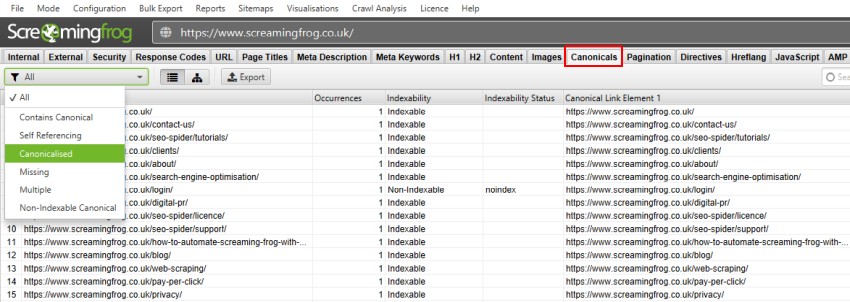
Google’s own documentation describes rel="canonical" as “a strong hint that we take into account… but Google may select a different page as the canonical.” Not a directive. A hint. Google overrides your canonical tag when:
- Internal links contradict the canonical. Every collection page links to
/collections/X/products/Ybut the canonical says/products/Y. Google sees stronger signals for the non-canonical version. - Backlinks point to the wrong URL. Someone links to the collection-scoped version, and that tips the scale.
- The non-canonical URL has stronger combined signals. Your canonical tag is one input among dozens.
Check Search Console yourself. The status “Duplicate, Google chose different canonical than user” means Google saw your canonical tag, considered it, and overruled it.
Ilana Davis, a respected Shopify SEO specialist, argues that most of these warnings can be ignored for small stores. We agree with her at that scale. A 50-product store with simple collections? Don’t lose sleep over it. But stores with 200+ products, multiple collections per product, tag pages, and those recommendation tracking parameters piling up? The issues compound fast. Link equity dilutes across thousands of URLs. Google picks the wrong canonical for dozens of products. Rankings slide, not from a penalty, but from fragmented authority.

How to Fix Shopify Duplicate Content: 7 Fixes
Priority order. Fix 1 first. Takes five minutes. Highest impact by far.
Fix 1: Remove | within: collection From Theme Code
The single biggest win. This stops your site from internally linking to non-canonical product URLs.
Find this in your theme:
<a href="{{ product.url | within: collection }}">Replace with:
<a href="{{ product.url }}">Where to look:
- Dawn and modern themes:
Sectionsfolder, look formain-collection-product-grid.liquid - Older themes:
Snippetsfolder, look forproduct-grid-item.liquidorproduct-card.liquid - Search every
.liquidfile forwithin: collection. Themes copy this code across multiple files. Miss one and some collection pages keep linking to duplicate URLs.
Steps:
- Backup your theme (Online Store > Themes > Actions > Duplicate)
- Open theme code (Actions > Edit Code)
- Search all files for
within: collection - Replace each instance
- Visit a collection page, click a product, confirm the URL shows
/products/and not/collections/
Those /collections/X/products/Y URLs still exist after this. They still carry canonical tags pointing to /products/Y. What changes is that your site stops linking to them. Internal links and canonical tags finally agree.
Watch out for breadcrumbs. This breaks them. The product page can no longer tell which collection the customer navigated from, so breadcrumbs show “Home > Products > Product Name” instead of “Home > Collection > Product Name.”
If that matters to you, store the collection context in session storage:
{% comment %} In your collection template {% endcomment %}
<script>
  sessionStorage.setItem('lastCollection', JSON.stringify({
    title: '{{ collection.title | escape }}',
    url: '{{ collection.url }}'
  }));
</script>
{% comment %} In your product template {% endcomment %}
<script>
const lastCollection = JSON.parse(sessionStorage.getItem('lastCollection'));
if (lastCollection) {
document.querySelector('.breadcrumb-collection').textContent = lastCollection.title;
document.querySelector('.breadcrumb-collection').href = lastCollection.url;
}
</script>If breadcrumbs aren’t a priority for your store, “Home > Products > Product Name” works perfectly fine from an SEO perspective.
Fix 2: Customise robots.txt.liquid
Shopify opened up robots.txt customisation in June 2021. Here’s the template we use:
{% for group in robots.default_groups %}
  {{- group.user_agent }}
  {%- for rule in group.rules -%}
    {{ rule }}
  {%- endfor -%}

  {%- if group.user_agent.value == '*' -%}
    {{ 'Disallow: /collections/*/products' }}
    {{ 'Disallow: /collections/*/*' }}
    {{ 'Disallow: /blogs/*/tagged' }}
    {{ 'Disallow: /*?q=*' }}
    {{ 'Disallow: /*sort_by*' }}
    {{ 'Disallow: /*?pr_prod_strat*' }}
    {{ 'Disallow: /*?pr_rec_id*' }}
  {%- endif -%}

  {%- if group.sitemap != blank -%}
    {{ group.sitemap }}
  {%- endif -%}
{% endfor %}
What each rule blocks:
/collections/*/productsblocks collection-scoped product URLs/collections/*/*blocks tag-filtered collection pages/blogs/*/taggedblocks blog tag pages/*?q=*blocks internal search result pages/*sort_by*blocks sort parameter URLs/*?pr_prod_strat*and/*?pr_rec_id*block Shopify’s recommendation tracking parameters
Fair warning: this is an unsupported customisation. Shopify Support won’t touch it. The template uses robots.default_groups to keep Shopify’s built-in rules intact and adds your custom rules on top. After saving, go to yourstore.com/robots.txt and verify it looks right. Get this wrong and you block Google from crawling your entire site.
Fix 3: Noindex Tag Pages
Add to the <head> section of theme.liquid:
{% if current_tags %}
  <meta name="robots" content="noindex, follow">
{% endif %}
Don’t combine noindex with a canonical tag pointing to the parent collection on the same page. Conflicting signals. Pick one.
And think strategically here. If a tag represents real search demand (“waterproof jackets,” for instance), don’t leave that intent sitting on a thin tag page. Build a proper subcollection with a clean URL, a unique H1, its own description, and internal links driving authority to it. Tag pages are filters. Subcollections are landing pages. Big difference. Our collection page SEO guide covers how to build and optimise these subcollections at scale.
Fix 4: Fix Pagination Canonical Tags
Google’s official guidance says each paginated page should self-canonicalise. Their reasoning: products on page 5 are unique content that only exists on page 5, and canonicalising everything to page 1 could prevent those deeper products from being indexed.
We’ve tested both approaches across our client stores and we get better results going against Google’s recommendation here. Every paginated page on Shopify shares the exact same H1, meta title, and meta description as page 1. No unique content exists on these pages. Just a different slice of products from the same grid. When they self-canonicalise, Google regularly ranks ?page=3 instead of the main collection URL.
Canonicalising to the main collection sends a cleaner signal, and the results back it up.
Our approach:
{% if template contains 'collection' and current_page != 1 %}
  <link rel="canonical" href="{{ shop.url }}{{ collection.url }}" />
{% else %}
  <link rel="canonical" href="{{ canonical_url }}" />
{% endif %}
Products on deeper pages remain discoverable through internal links and the XML sitemap. This only controls which version of the collection page itself shows up in search.
Shopify’s default behaviour is self-referencing canonicals on paginated pages, so if you skip this fix nothing breaks. But regardless, fix the ?page=1 duplicate:
{%- if paginate.current_page == 2 -%}
  <a href="{{ paginate.previous.url | replace: '?page=1', '' }}">Previous</a>
{%- else -%}
  <a href="{{ paginate.previous.url }}">Previous</a>
{%- endif -%}
Fix 5: Handle /collections/all
Noindex it:
{% if collection.handle == 'all' %}
  <meta name="robots" content="noindex, follow">
{% endif %}
Or block it in robots.txt. Pull it from your navigation menus while you’re at it. This page has no reason to be crawled, indexed, or linked to from anywhere on your site.
Fix 6: Noindex Blog Tag Pages
{% if request.path contains '/tagged/' %}
  <meta name="robots" content="noindex, follow">
{% endif %}
Fix 7: Audit and Fix Redirect Chains
When you change a product or collection URL handle in Shopify admin, there’s a checkbox that says “Create a URL redirect for.” Check it. This is not automatic. You have to opt in every time you make the change.
Some things to keep in mind:
- Audit existing redirects for chains. If you have A pointing to B pointing to C, collapse it to A pointing directly to C.
- Don’t redirect deleted products to the homepage. Point them to the most relevant collection or a comparable product.
- Shopify only supports exact-match 301 redirects. No wildcards. No regex.
- Renaming a collection does not fix compound paths. If someone bookmarked
/collections/old-name/products/widget, that URL breaks even after the collection redirect is set up. - For bulk work, use the CSV import feature (Settings > Navigation > URL Redirects > Import).
Shopify URL Limitations You Have to Accept
Some things are baked into the platform and no amount of Liquid editing will change them:
- URL prefixes are permanent. Cannot remove
/products/,/collections/,/pages/, or/blogs/. No flat URL structures on Shopify. - No subcategory nesting. Cannot build
/collections/mens/shoes/trainers. Collections are one level deep, period. You can simulate hierarchy with breadcrumbs and internal linking, but Shopify won’t give you nested URLs. - Sitemap is auto-generated. No manual control over which URLs appear.
- Only 301 redirects. No 302, 307, or 308 options.
- No regex redirects. Exact-match only.
- No server config. No .htaccess. No nginx rules.
None of this meaningfully hurts rankings for the vast majority of Shopify stores. Google stopped caring about URL depth years ago. The duplicate content fixes covered above are what move the needle.
Selling internationally through Shopify Markets? That creates another layer of this problem. Shopify generates subfolders for each locale (/en-gb/products/widget, /fr/products/widget) with hreflang tags. If the content isn’t genuinely translated or localised, this stacks on top of every duplicate content issue in this guide. International stores need to address hreflang as its own project.
Running headless Shopify with Hydrogen? Most of these problems vanish. Full control over URL structure. No forced prefixes. No within: collection. You do have to build canonical tags into your frontend yourself, but the trade-off is real URL freedom. Whether that’s worth the development overhead depends on your store.
How to Check If Your Fixes Are Working
Google Search Console
What the common statuses mean for Shopify stores:
Alternate page with proper canonical tag Google recognises the duplicate and follows your canonical. Usually fine. Monitor the count, it should drop after your fixes.
Duplicate, Google chose different canonical than user Google disagrees with your canonical. That’s a problem. Align your internal links with the canonical URL and check for contradicting signals.
Duplicate without user-selected canonical No canonical tag on this page, so Google picked one for you. Add canonical tags.
Crawled, currently not indexed Google crawled it, decided it wasn’t worth indexing. Usually tag or filter pages. Noindex or block in robots.txt.
Crawl Verification
Run Screaming Frog before and after. Compare three things:
- Canonical mismatch report. Should show fewer mismatches.
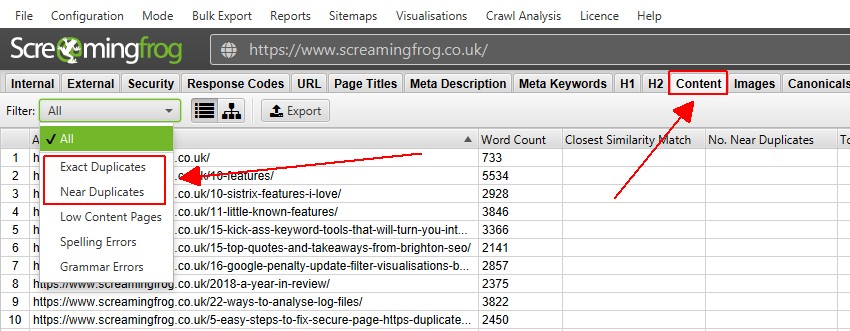
- Duplicate content report (filter by MD5 hash). Fewer exact duplicates.
- Total crawlable URL count. Should drop after robots.txt changes take hold.
Give robots.txt changes a week or two to affect crawl patterns. GSC warnings take four to six weeks to decrease as Google recrawls your site.
Frequently Asked Questions
Does Shopify handle duplicate content on its own?
Partially. Canonical tags go on most pages, and Shopify gets variant URL canonicalisation right. But the default theme code links to non-canonical URLs from every collection page, which actively works against those canonical tags. You need to fix the internal links and verify the canonicals are pointing where you want them. Both sides of the equation.
Will duplicate content get my store penalised?
No. There is no duplicate content penalty. John Mueller has confirmed this explicitly. What happens instead is that link equity splits across multiple URLs and Google can choose the wrong page to display in search results. Hundreds of products across multiple collections means these signal-splitting effects compound. Not a penalty. Just diluted authority, which looks like the same thing from the outside.
How many duplicate URLs does a typical Shopify store have?
A store with 500 products in 3 collections each has at least 2,000 crawlable product URLs from collection-scoped URLs alone. Layer on tag pages, pagination, variants, sort parameters, and recommendation tracking, and you hit 10,000 to 50,000+. The extreme case: a 200-product store with over 1 million discovered URLs, almost entirely from pr_prod_strat parameters.
Should I use an app to fix canonical tags?
Apps like Canonical Tag URL Manager handle per-page overrides without touching code. Useful for one-off fixes. But for the core problem (collection-scoped product URLs), editing the theme Liquid is more effective and doesn’t slow your store down with another app. And never install more than one SEO app at a time. They fight each other and can produce duplicate structured data, which is its own flavour of mess.
Is it safe to edit robots.txt.liquid?
Yes, if you’re careful. Keep Shopify’s defaults in place using robots.default_groups and only add rules on top. Check yourstore.com/robots.txt after every save. Shopify Support won’t help you here. This is on you.
What about variant URLs?
Shopify canonicalises variant URLs (/products/widget?variant=12345) to the parent product URL correctly. One of the few areas where the default behaviour works as it should. If your variants are genuinely different products with their own search demand, build them as separate products so each gets its own URL and can rank on its own.
Need Help With Your Store’s URL Structure?
Our Shopify SEO audit covers all eight duplicate content sources above, with specific Liquid code fixes written for your theme. We also go through your Google Search Console data to find which products have canonical mismatches and where link equity is leaking.
If your store has 200+ products and Search Console is full of “Alternate page with proper canonical tag” warnings, get in touch and we’ll walk through what your store needs.